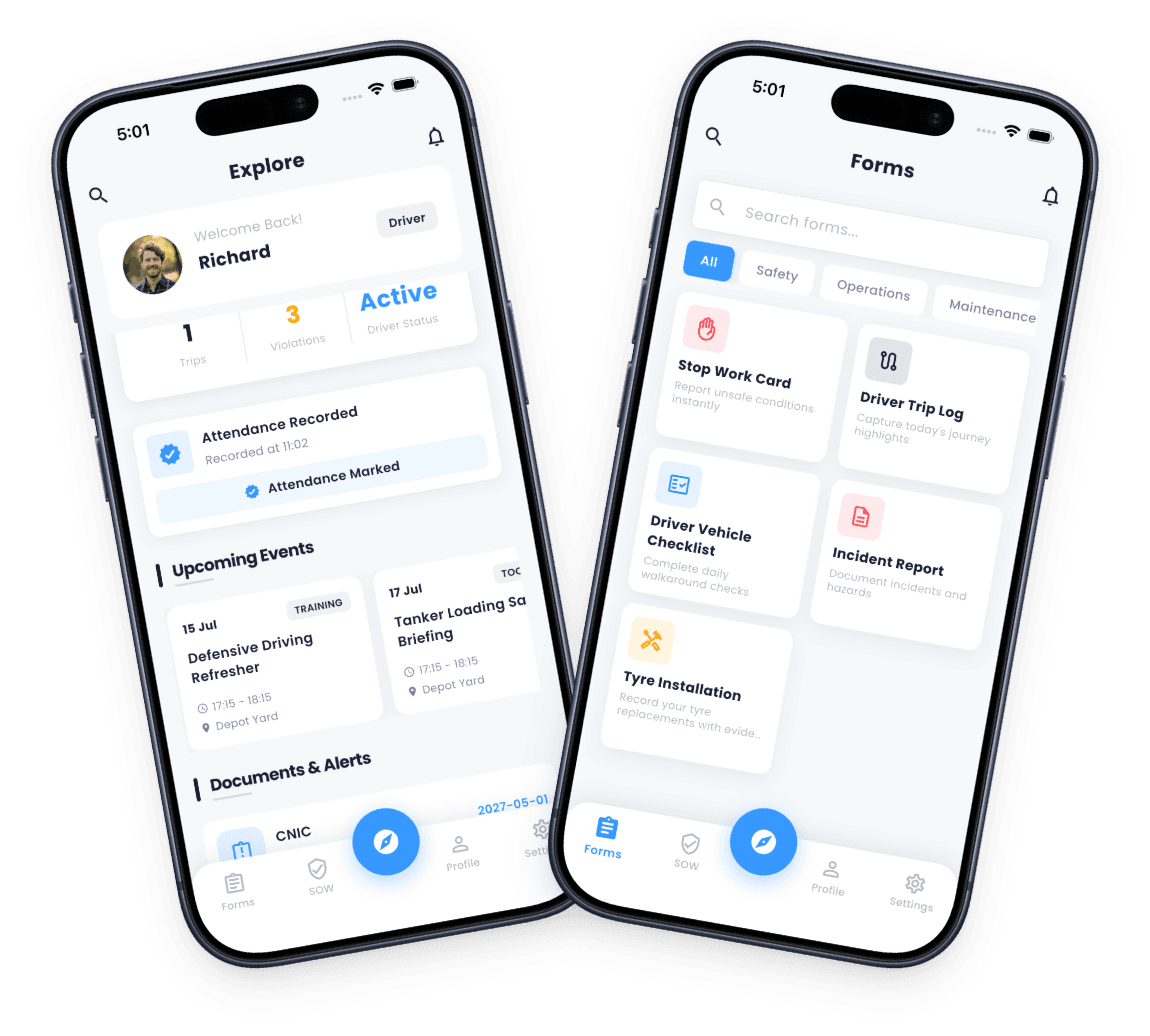
For fleet managers, transport coordinators and drivers.
RT360WEB WORKSPACE
Fleet oversight. Driver records. Journey follow-up.
How the work connects
The journey is more than a trip log.
Keep each step connected to the people responsible for what happens next.
01
Prepare
Review driver and vehicle records.
02
Check
Complete pre-trip vehicle checks.
03
Record
Capture the journey and exceptions.
04
Follow up
Review issues and maintenance actions.
Inside RT360
Built for the detail of your operation.
Explore the workflows your team can manage in one product.
01 / CORE WORKFLOW
Journey closure and product-loss reconciliation
Close each tanker journey against a route standard: planned vs actual kilometres and days, product loaded vs shortage, and loading and unloading temperature and density, all checked against your own shortage tolerance in litres or percent.
02 / CORE WORKFLOW
Tyre lifecycle on a 3D truck
See your tyres on an interactive 3D model of the truck. Click any wheel position to open that individual tyre's journey: the kilometres and miles it has run, its tread depth, rotations, retreads and scrap history, with wear and replacement alerts driven by real odometer data. The vehicle itself carries fitness, route permits, insurance and hydro and hose tests, each with its own expiry alert.
03 / CORE WORKFLOW
One mobile app, driver or admin
One app, two sign-ins: admins log in to approve, assign and track on the move, while drivers sign in with their own passkey-secured identity to complete pre-trip vehicle checklists, raise stop-work and incident reports from the roadside, request leave, and submit document renewals for a manager to approve.
Go deeper into RT360.
Explore the capabilities behind your everyday work.
Driver compliance, in one record
Every driver's licenses, medicals, DDC and JCP, drug-and-alcohol and police-verification dates live in one profile, with expired and expiring-soon flags surfaced right on the driver list. Onboard an existing fleet from a CSV with a validated preview before anything is saved.
Trip planning and live execution
Run each haul through plan, approval, in-progress and closure. Reusable route templates pre-fill known lanes, planned-vs-actual distance, fuel and cost are measured per trip, and every pause, driver handover and on-trip incident is logged with time and GPS.
Preventive maintenance, your rules
Build your own service schedules on whatever basis you run to, mileage, time, engine hours or calendar, per vehicle type, and set the alerts. The system raises due, overdue and critical warnings, with pre-warnings and manager escalation, before a truck breaks down. Repairs then run as costed, approved orders with parts and labour drawn from inventory.
Driver safety monitoring
Consolidate IVMS telematics events (speeding, harsh braking, fatigue), roadside spot checks against a configurable checklist, and a trip-linked violation register into one defensible per-driver risk picture.
Annual training matrix
A fleet-scoped, driver-by-topic grid that computes completed, due-soon and overdue against each topic's date, separates induction from refresher, and does not falsely flag mid-year joiners already covered during induction.
Fuel custody and trip finance
End-to-end fuel custody from loading to customer tank with seal and quality checks, plus trip expenses, driver cash advances, and a daily ledger of revenue, cost and margin, without a separate finance system.
Work from the field
The work happens away from a desk.
Give drivers access to checklists, trip logs and safety reporting. Let managers review approvals and follow up while they are away from the office.
Per-module permissions where each right is scoped to own-records or all-records, so a reporter sees only what they raised while a manager sees everything.
Confidential records
Seal a sensitive incident, investigation or driver file to a named list, hidden even from users who would otherwise have access.
Enterprise sign-in
Two-factor with backup codes, WebAuthn passkeys, trusted devices, auto-lockout, and geolocated sessions you can revoke remotely.
Audit trail by default
Every record keeps a full who-changed-what-and-when timeline, folding in its attachments, notes and approvals.
AI that assists, not overrides
Drafts classifications and summaries, tracked per field and cleared the moment a person edits, with a hard per-workspace spend cap.
Reports and exports
Branded PDF and Excel reports over any date range, delivered in-app or by email, plus CSV export on every listing.
Cloud infrastructure
Hosted on AWS with encrypted connections and daily backups, and every workspace runs in its own timezone and currency.
Implementation
Start focused. Expand with confidence.
Bring your forms, reporting needs and approval process. We’ll demonstrate relevant workflows, define a pilot and agree the scope before rollout.